
5/7/2026 Admin
SimpleChat: A Provider-Agnostic AI Chat Starter for Blazor
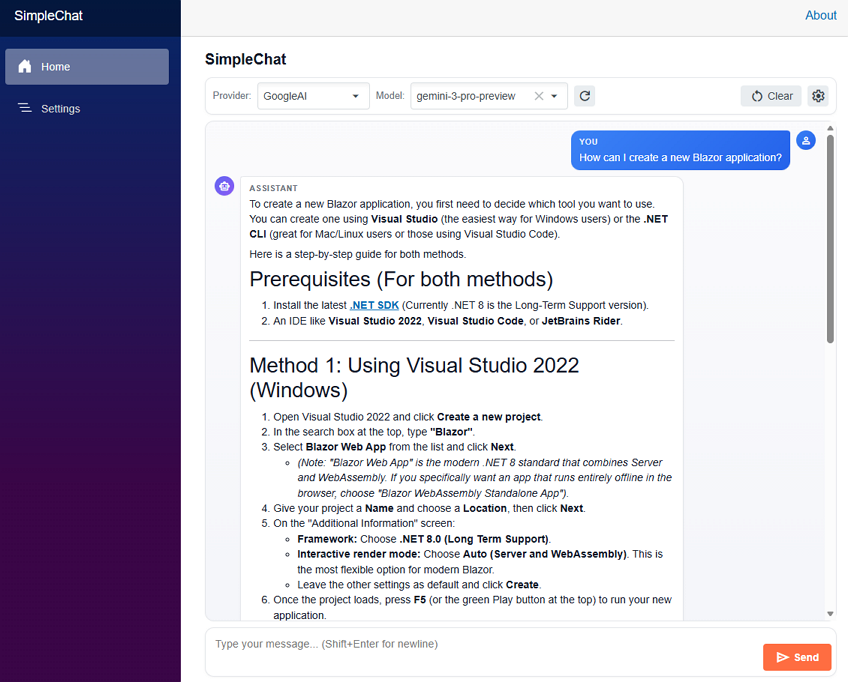
Most of the open-source projects I build these days end up calling an LLM. Every time, I find myself writing the same boilerplate to wire up OpenAI, Azure OpenAI, Anthropic, or Google. SimpleChat is the starter project that ends that cycle.
The idea is simple. SimpleChat is a clean, working Blazor + .NET 10 Aspire chat application that already knows how to talk to OpenAI, Azure OpenAI, Anthropic, and Google AI — and it lets the end user pick the provider and the model at runtime.
The real purpose of the project is to be a template for AI agents. When I start a new app, I can point an AI coding agent at this repository and say: “implement the configuration of SimpleChat, but save the AI settings in a database (or a JSON file, or Azure Key Vault, or wherever I tell you).” All the painful provider-specific glue is already done.
Why This Project Exists
Every time I added AI to a Blazor app I had to re‑solve the same problems:
- OpenAI uses an API key and a base URL.
- Azure OpenAI uses an endpoint, a deployment name, and an API version.
- Anthropic has its own REST contract, its own headers, and rejects
temperatureon Claude 4 reasoning models. - Google AI (Gemini) has yet another REST shape under
generativelanguage.googleapis.com. - Each one has a different
/modelsendpoint — and OpenAI'so‑series andgpt-5-*models reject any customtemperature.
I wanted one abstraction so the rest of the app never has to care which provider is active. SimpleChat does exactly that by sitting on top of Microsoft.Extensions.AI and exposing a single IChatClient.
The bigger goal is reuse. Once an agent understands SimpleChat's AIConfigurationService + ChatClientFactory pattern, it can drop the same pattern into any new project and adapt the storage layer (appsettings, SQL, Cosmos, Key Vault, browser local storage, etc.) without touching the chat code itself.
Features
Multi-Provider AI Out Of The Box
SimpleChat ships with first-class support for four providers and a uniform settings shape for all of them:
- OpenAI — uses the official
OpenAISDK throughMicrosoft.Extensions.AI.OpenAI. - Azure OpenAI — uses
Azure.AI.OpenAIwith an endpoint + deployment name. - Anthropic — a hand-written
AnthropicChatClientthat adapts the Anthropic REST API toIChatClient. - Google AI — a hand-written
GoogleAIChatClientthat adapts Gemini’s REST API toIChatClient.
All four expose the same IChatClient to the rest of the app, so the chat UI does not branch on provider.
Runtime Provider And Model Switching

The user can change the provider and model from the chat toolbar without restarting the app. The dropdown is populated from each provider’s live /models endpoint (with a sensible hard-coded fallback list when the call fails or no key is set).
Streaming Chat With Cancellation
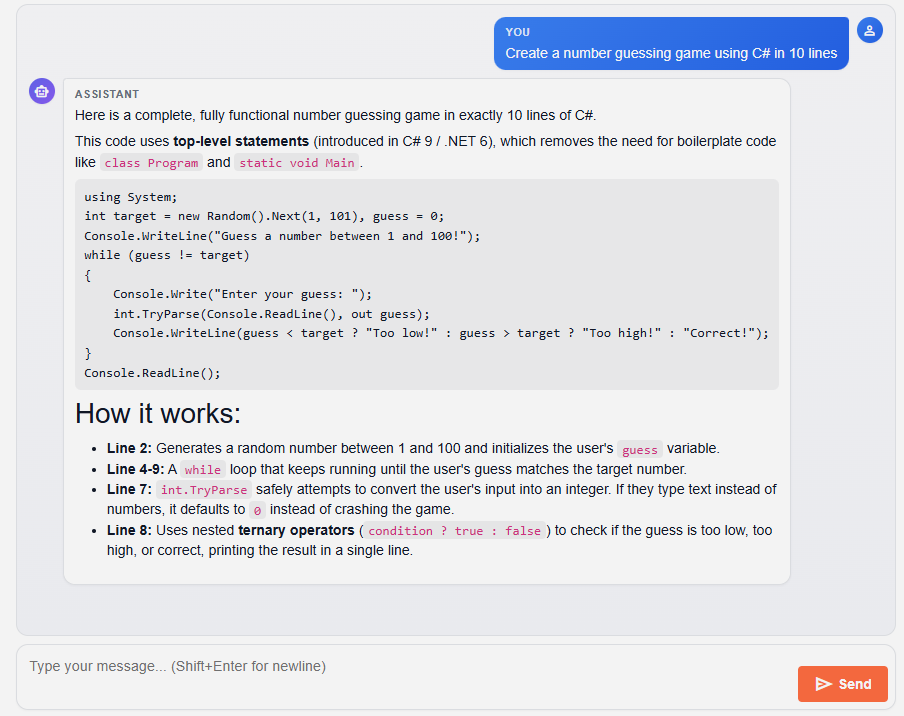
ChatService.StreamAsync returns an IAsyncEnumerable<string> of token chunks. The UI streams updates into the latest assistant bubble as they arrive and supports a Cancel button that aborts the in-flight call.
Settings Page That Writes Back To Disk
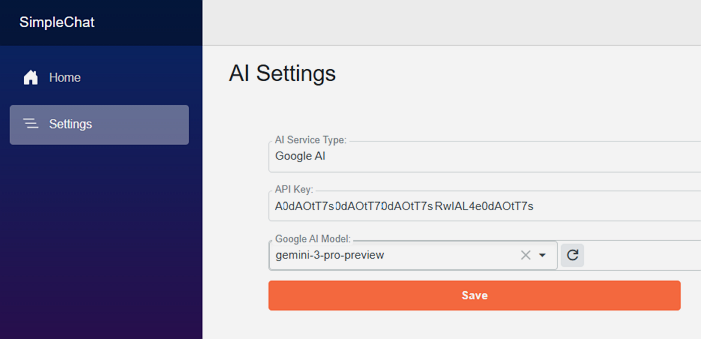
The Settings page edits the AI section of the configuration. In Development the changes are written to appsettings.Development.json. In Production they are written to a side file called appsettings.User.json that is layered on top of appsettings.json at startup, so real keys never have to be committed.
Built On .NET 10 Aspire
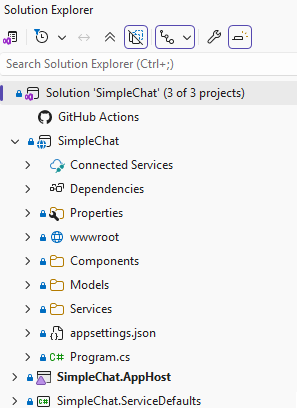
The repo is structured as a normal Aspire solution with three projects:
SimpleChat— the Blazor Server web app.SimpleChat.AppHost— the Aspire orchestrator.SimpleChat.ServiceDefaults— shared OpenTelemetry, health checks, and resilience defaults.
High-Level Architecture
The whole app is intentionally small. There is one Blazor Server front end, one configuration service, one factory that produces an IChatClient, and a thin streaming orchestrator on top.
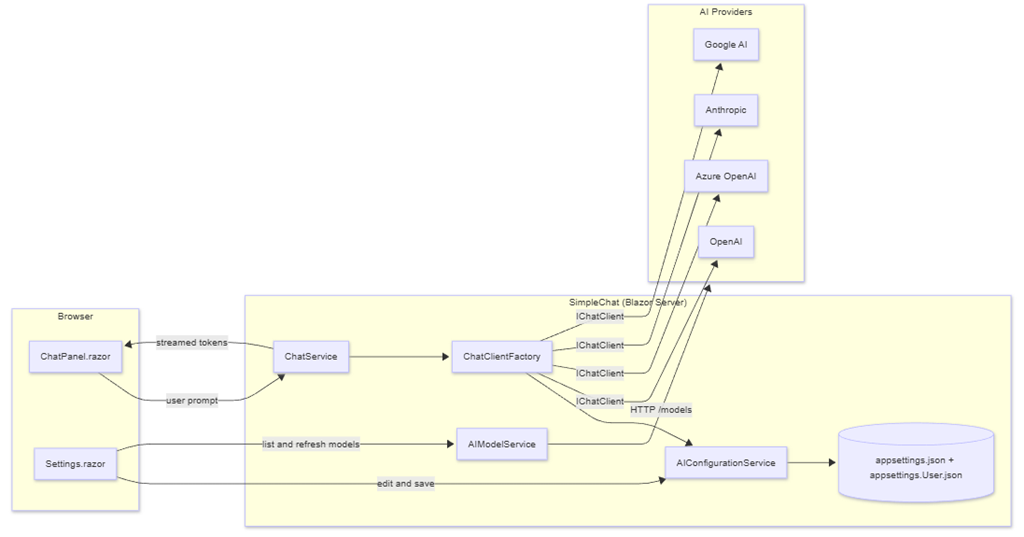
Component Responsibilities
| Component | Responsibility |
|---|---|
Components/Chat/ChatPanel.razor | Provider/model picker, message list, streaming display, Cancel/Clear. |
Components/Chat/MessageList.razor, MessageBubble.razor, MessageInput.razor | Presentation pieces of the chat surface. |
Components/Pages/Settings.razor | Lets the user pick a provider, enter the API key/endpoint/version, browse models, test the connection, and save. |
Services/AI/AIConfigurationService.cs | Reads the AI section, returns typed AIOptions/ProviderOptions, and writes user edits back to appsettings.Development.json (Dev) or appsettings.User.json (Prod). |
Services/AI/AIModelService.cs | Calls each provider’s /models endpoint, with a fallback list per provider. |
Services/AI/ChatClientFactory.cs | The single place that knows how to build an IChatClient for each provider key. |
Services/AI/ChatService.cs | Stateless orchestrator that streams responses from the active IChatClient. |
Services/AI/AnthropicChatClient.cs, GoogleAIChatClient.cs | Custom IChatClient adapters for providers that don’t have a first-party MEAI package. |
Services/AI/AICapabilities.cs | Knows which models reject custom temperature (GPT-5, o-series, Claude 4.x). |
Models/AIOptions.cs, ChatMessage.cs | Strongly-typed configuration and chat turn types. |
The Configuration Model
Everything the app needs to know about a provider lives in a single AI section in appsettings.json:
{"AI": {"ActiveProvider": "OpenAI","Providers": {"OpenAI": {"Enabled": true,"ApiKey": "","Endpoint": "https://api.openai.com/v1","DefaultModel": "gpt-4o-mini","Models": [ "gpt-4o-mini", "gpt-4o", "gpt-5-mini", "o4-mini" ]},"AzureOpenAI": {"Enabled": false,"ApiKey": "","Endpoint": "","DeploymentName": "","ApiVersion": "2024-10-21","Models": [ "gpt-4o", "gpt-4o-mini" ]},"Anthropic": {"Enabled": false,"ApiKey": "","Endpoint": "https://api.anthropic.com","DefaultModel": "claude-sonnet-4-20250514"},"GoogleAI": {"Enabled": false,"ApiKey": "","Endpoint": "https://generativelanguage.googleapis.com","DefaultModel": "gemini-2.5-flash"}},"Defaults": {"Temperature": 0.7,"MaxOutputTokens": 1024,"SystemPrompt": "You are a helpful assistant."}}}
This shape is the contract. If you want to swap the storage layer (database, Key Vault, browser storage, file share, etc.), you only need to change AIConfigurationService so that it reads and writes this same object graph. Nothing else in the app changes.
The strongly-typed model in Models/AIOptions.cs:
public sealed class AIOptions{public const string SectionName = "AI";public string ActiveProvider { get; set; } = "OpenAI";public Dictionary<string, ProviderOptions> Providers { get; set; } = new();public ChatDefaults Defaults { get; set; } = new();}public sealed class ProviderOptions{public bool Enabled { get; set; }public string? ApiKey { get; set; }public string? Endpoint { get; set; }public string? DefaultModel { get; set; }public string? DeploymentName { get; set; } // Azure onlypublic string? ApiVersion { get; set; } // Azure onlypublic List<string> Models { get; set; } = new();}
Wiring It Up In Program.cs
Program.cs is intentionally short. It registers the options binder, the configuration service, the client factory, the model lister, and the chat orchestrator — and it adds the optional writable overlay file used in production:
var builder = WebApplication.CreateBuilder(args);builder.AddServiceDefaults();// Optional writable overlay for production.var userOverlay = Path.Combine(builder.Environment.ContentRootPath, "appsettings.User.json");builder.Configuration.AddJsonFile(userOverlay, optional: true, reloadOnChange: true);builder.Services.AddRazorComponents().AddInteractiveServerComponents();builder.Services.AddRadzenComponents();builder.Services.AddOptions<AIOptions>().Bind(builder.Configuration.GetSection(AIOptions.SectionName));builder.Services.AddSingleton<AIConfigurationService>();builder.Services.AddSingleton<ChatClientFactory>();builder.Services.AddHttpClient();builder.Services.AddHttpClient<AIModelService>();builder.Services.AddScoped<ChatService>();
reloadOnChange: true is what makes the Settings page feel alive — saving the file causes IOptionsMonitor<AIOptions> to fire OnChange, which the ChatPanel subscribes to so the provider dropdown refreshes without a page reload.
How A Chat Message Flows Through The System
The chat round trip is straightforward but worth seeing end-to-end. The sequence below is what happens when the user types a message and hits Send.
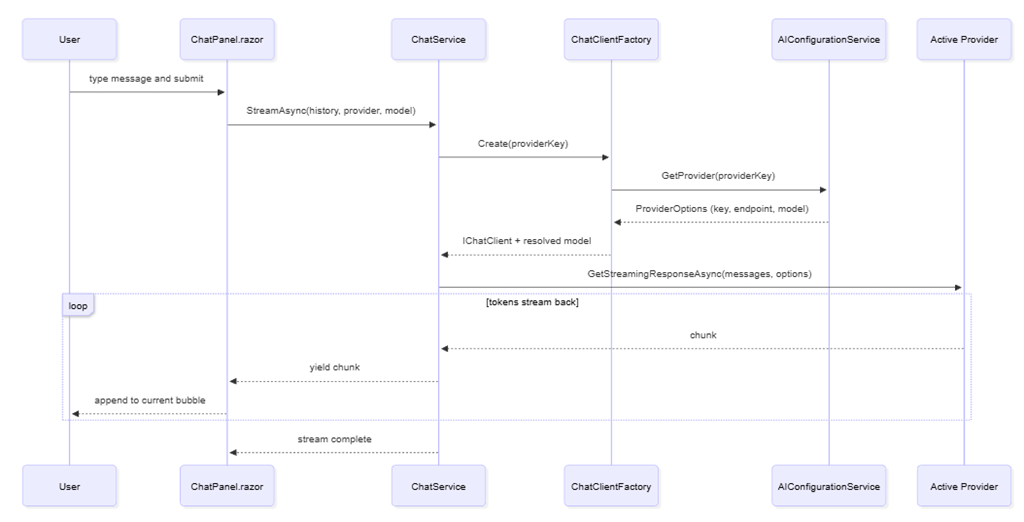
A few details that matter:
ChatServiceis stateless beyond the in-memoryList<ChatTurn>held by the component. If you want persistence, you add it on top — the orchestrator does not get in your way.- The system prompt from
AI:Defaults:SystemPromptis prepended only if the caller did not already include a system message. - The factory returns the resolved model name. For Azure OpenAI that is the deployment name; for everyone else it is
DefaultModel.
How A Settings Save Flows Through The System
Saving from the Settings page is what makes SimpleChat reusable: the provider list, the active provider, and per-provider keys/endpoints/models all change at runtime.
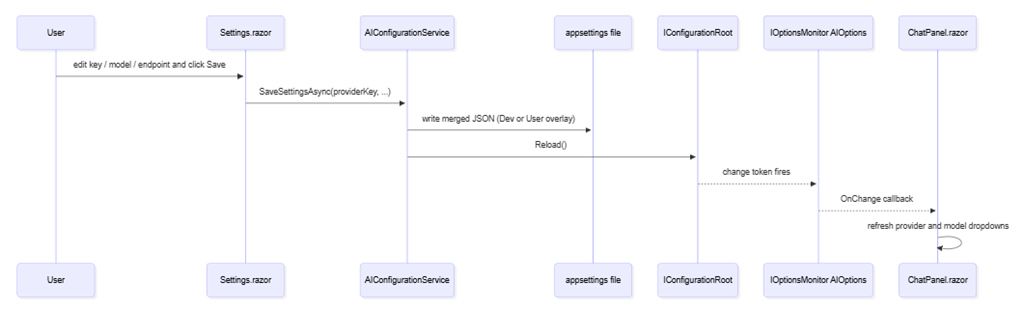
The key trick is in AIConfigurationService.WritablePath:
private string WritablePath => _env.IsDevelopment()? Path.Combine(_env.ContentRootPath, "appsettings.Development.json"): Path.Combine(_env.ContentRootPath, "appsettings.User.json");
In Development the file is already part of the layered configuration. In Production we register appsettings.User.json as an additional source in Program.cs, so the production writable file is separate from the committed appsettings.json. You never have to risk checking in real keys.
Inside The ChatClientFactory
The factory is the single place where the app cares about the difference between providers. After this method returns, everything downstream just sees an IChatClient.
public (IChatClient Client, string Model) Create(string providerKey){var key = NormalizeProviderKey(providerKey);var settings = _config.GetProvider(key);if (!settings.Enabled)throw new InvalidOperationException($"Provider '{providerKey}' is disabled.");IChatClient inner;string model;switch (key){case "OpenAI":model = settings.DefaultModel ?? "gpt-4o-mini";var openAI = new OpenAIClient(new ApiKeyCredential(settings.ApiKey!), new OpenAIClientOptions{Endpoint = string.IsNullOrWhiteSpace(settings.Endpoint) ? null : new Uri(settings.Endpoint!)});inner = openAI.GetChatClient(model).AsIChatClient();break;case "AzureOpenAI":model = settings.DeploymentName!;var azure = new AzureOpenAIClient(new Uri(settings.Endpoint!), new AzureKeyCredential(settings.ApiKey!));inner = azure.GetChatClient(model).AsIChatClient();break;case "GoogleAI":model = settings.DefaultModel ?? "gemini-2.5-flash";inner = new GoogleAIChatClient(settings.ApiKey!, model, _httpClientFactory.CreateClient(nameof(GoogleAIChatClient)));break;case "Anthropic":model = settings.DefaultModel ?? "claude-sonnet-4-20250514";inner = new AnthropicChatClient(settings.ApiKey!, model, _httpClientFactory.CreateClient(nameof(AnthropicChatClient)));break;default:throw new InvalidOperationException($"Unknown provider '{providerKey}'.");}var built = new ChatClientBuilder(inner).UseLogging(_loggerFactory).UseOpenTelemetry(_loggerFactory, sourceName: "SimpleChat.Chat").Build();return (built, model);}
The pipeline UseLogging(...).UseOpenTelemetry(...) is one of the nicest things Microsoft.Extensions.AI gives you. Every chat call is now traced and logged the same way regardless of provider.
Streaming In The ChatService
ChatService.StreamAsync is the only method the UI talks to. It builds the message list, decides whether the model accepts a custom temperature, and yields chunks as they arrive:
public async IAsyncEnumerable<string> StreamAsync(IEnumerable<ChatTurn> history,string? providerKeyOverride = null,string? modelOverride = null,[EnumeratorCancellation] CancellationToken ct = default){var defaults = _options.CurrentValue.Defaults;var providerKey = providerKeyOverride ?? _options.CurrentValue.ActiveProvider;var (client, defaultModel) = _factory.Create(providerKey);using var _ = client;var messages = new List<MEAIChatMessage>();if (!history.Any(m => m.Role == ChatTurnRole.System) && !string.IsNullOrWhiteSpace(defaults.SystemPrompt))messages.Add(new MEAIChatMessage(MEAIChatRole.System, defaults.SystemPrompt));foreach (var m in history)messages.Add(new MEAIChatMessage(MapRole(m.Role), m.Content));var effectiveModel = string.IsNullOrWhiteSpace(modelOverride) ? defaultModel : modelOverride;var chatOptions = new ChatOptions { ModelId = effectiveModel, MaxOutputTokens = defaults.MaxOutputTokens };var supportsTemperature = AICapabilities.IsAnthropic(providerKey)? AICapabilities.AnthropicSupportsTemperature(effectiveModel): AICapabilities.SupportsCustomTemperature(effectiveModel);if (supportsTemperature)chatOptions.Temperature = defaults.Temperature;await foreach (var update in client.GetStreamingResponseAsync(messages, chatOptions, ct)){if (!string.IsNullOrEmpty(update.Text))yield return update.Text;}}
The AICapabilities gate is the line that prevents the most common 400 error with modern reasoning models — “temperature is not supported for this model” — without forcing the rest of the app to know about it.
The Settings Page
The Settings page is a single Razor component that drives the entire configuration story. Its job is to be obvious to a non-developer end user.
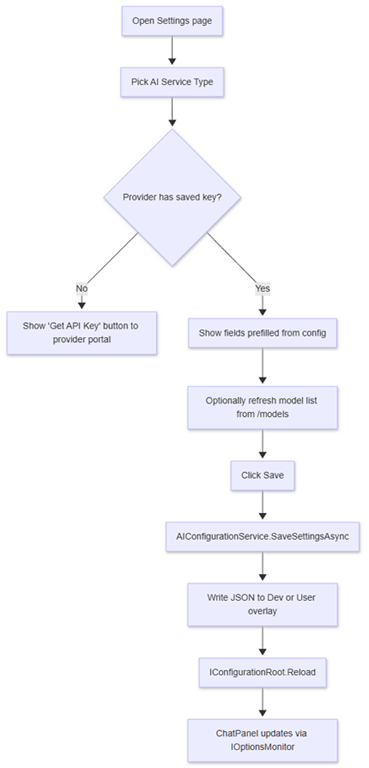
When the provider is Azure OpenAI, the page reveals two extra fields: Endpoint and API Version. The model dropdown is relabeled Deployment Name. For all other providers it shows the standard API Key and Default Model fields plus a refresh button that calls the provider’s live /models endpoint.
Why This Is A Good Starter For AI-Driven Coding
The whole point of SimpleChat is to be the boilerplate you stop writing. When I start a new app and want AI in it, I do this:
- Open the new project in VS Code.
- Open Copilot Chat in agent mode.
- Point it at this repo and say: “copy the AI configuration model and chat services from SimpleChat into this project, but persist
AIOptionsto <wherever I want this time> instead ofappsettings.json.”
Because the storage concern is isolated inside AIConfigurationService, the agent’s job is well-scoped:
- Save to a database? Replace the JSON read/write in
AIConfigurationServicewith EF Core or Dapper calls against aSettingstable. Everything else stays the same. - Save to Azure Key Vault? Replace the writable file path with a Key Vault client. Read the
Modelsarray from a separate non-secret table. - Save to browser local storage (Blazor WebAssembly)? Replace
AIConfigurationServicewith aBlazored.LocalStorage-backed implementation that exposes the same surface. - Save to a JSON file in
%APPDATA%? Trivial — changeWritablePath.
Either way, ChatClientFactory, ChatService, ChatPanel.razor, and Settings.razor keep working unchanged.
Quick-Start
Requirements
- Visual Studio 2026 or VS Code
- .NET 10 SDK
- An API key for at least one of: OpenAI, Azure OpenAI, Anthropic, or Google AI
Run It
Clone the repo and open the solution:
git clone https://github.com/ADefWebserver/SimpleChatcd SimpleChat
Set SimpleChat.AppHost as the startup project and run it. The Aspire dashboard launches and starts the simplechat web app.
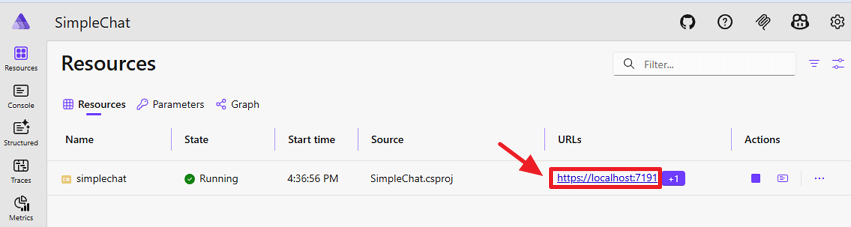
Open the simplechat endpoint in your browser, navigate to Settings, pick a provider, paste your API key, choose a model, and click Save. Go back to the chat page and start typing.